MUGEN人物文件夹图标生成工具【v1.0】 - 更新历史


组长【windkey】 添加了:
程序名称: MUGEN人物文件夹图标生成工具【v1.0】
类型: 3
作者: windkey
作者ID: 11933
关键词: 直播,windkey,战斗统计,随机,辅助,定制
缩略图: https://image.qxmugen.com/uploads/images/20220919/20fe3f4e983d5e5701d8d1a98a11fd70da94d1f08c2fdf60a3c7bd16297d82e92775ced9.png
下载地址: https://pan.baidu.com/s/1Pxvrv_geBm3k3gz9kk8fZw
需要翻墙: 0
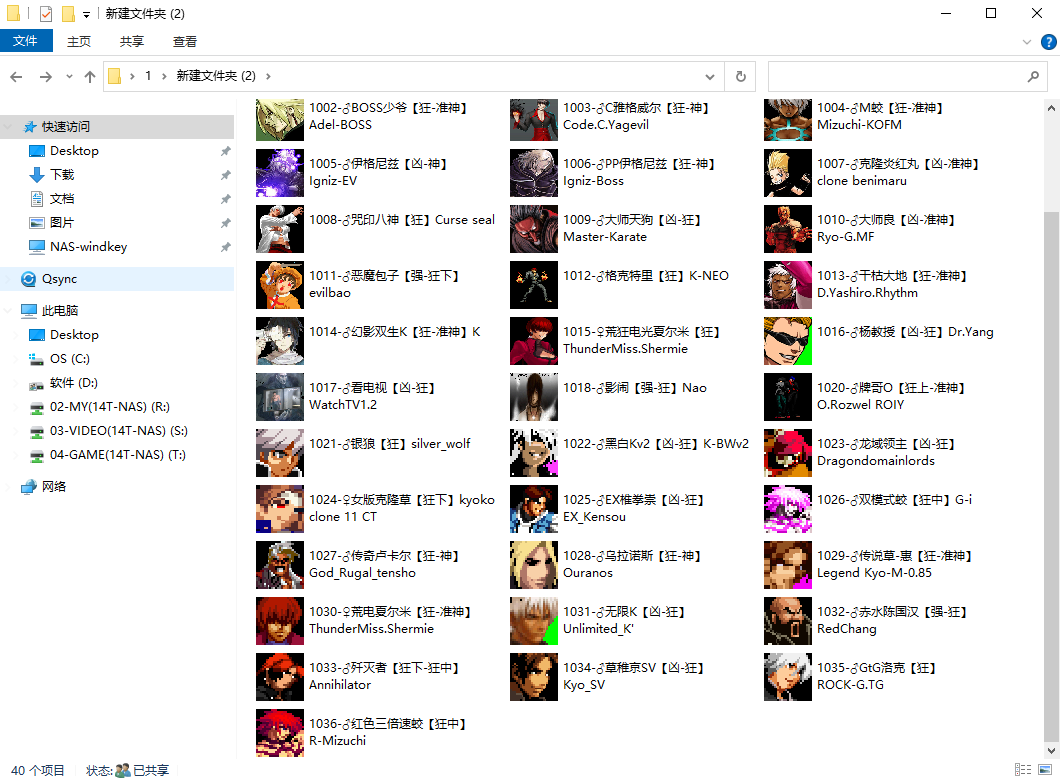
工具简介: 批量生成文件夹图标,可选头像为9000,1或9000,0 程序为64位,32位懒得编译了,应该没多少电脑是32位的了吧? 提取码:6666
备注: 把人物文件夹拖到表格里,然后点设置文件夹图片即可。有的系统可能需要刷新或重启!如果还不管用就这样了,懒得写的太深。
关联用户ID: 13104
状态: 正常
2022-09-19 18:17:53

组长【windkey】 修改了:
使用说明: <p><span style="color: rgb(51, 51, 51); font-family: &quot;Segoe UI&quot;, &quot;Lucida Grande&quot;, Helvetica, Arial, &quot;Microsoft YaHei&quot;, FreeSans, Arimo, &quot;Droid Sans&quot;, &quot;wenquanyi micro hei&quot;, &quot;Hiragino Sans GB&quot;, &quot;Hiragino Sans GB W3&quot;, FontAwesome, sans-serif; font-size: 14px; background-color: rgb(255, 255, 255);">批量生成文件夹图标,可选头像为9000,1或9000,0</span><br style="box-sizing: border-box; color: rgb(51, 51, 51); font-family: &quot;Segoe UI&quot;, &quot;Lucida Grande&quot;, Helvetica, Arial, &quot;Microsoft YaHei&quot;, FreeSans, Arimo, &quot;Droid Sans&quot;, &quot;wenquanyi micro hei&quot;, &quot;Hiragino Sans GB&quot;, &quot;Hiragino Sans GB W3&quot;, FontAwesome, sans-serif; font-size: 14px; white-space: normal; background-color: rgb(255, 255, 255);"/><span style="color: rgb(51, 51, 51); font-family: &quot;Segoe UI&quot;, &quot;Lucida Grande&quot;, Helvetica, Arial, &quot;Microsoft YaHei&quot;, FreeSans, Arimo, &quot;Droid Sans&quot;, &quot;wenquanyi micro hei&quot;, &quot;Hiragino Sans GB&quot;, &quot;Hiragino Sans GB W3&quot;, FontAwesome, sans-serif; font-size: 14px; background-color: rgb(255, 255, 255);">程序为64位,32位懒得编译了,应该没多少电脑是32位的了吧?</span></p><p><span style="color: rgb(51, 51, 51); font-family: &quot;Segoe UI&quot;, &quot;Lucida Grande&quot;, Helvetica, Arial, &quot;Microsoft YaHei&quot;, FreeSans, Arimo, &quot;Droid Sans&quot;, &quot;wenquanyi micro hei&quot;, &quot;Hiragino Sans GB&quot;, &quot;Hiragino Sans GB W3&quot;, FontAwesome, sans-serif; font-size: 14px; background-color: rgb(255, 255, 255);">使用方法:</span></p><p><span style="color: rgb(51, 51, 51); font-family: &quot;Segoe UI&quot;, &quot;Lucida Grande&quot;, Helvetica, Arial, &quot;Microsoft YaHei&quot;, FreeSans, Arimo, &quot;Droid Sans&quot;, &quot;wenquanyi micro hei&quot;, &quot;Hiragino Sans GB&quot;, &quot;Hiragino Sans GB W3&quot;, FontAwesome, sans-serif; font-size: 14px; background-color: rgb(255, 255, 255);"><br/></span></p>
2022-09-19 18:18:16

组长【windkey】 修改了:
使用说明: <p><span style="color: rgb(51, 51, 51); font-family: &quot;Segoe UI&quot;, &quot;Lucida Grande&quot;, Helvetica, Arial, &quot;Microsoft YaHei&quot;, FreeSans, Arimo, &quot;Droid Sans&quot;, &quot;wenquanyi micro hei&quot;, &quot;Hiragino Sans GB&quot;, &quot;Hiragino Sans GB W3&quot;, FontAwesome, sans-serif; font-size: 14px; background-color: rgb(255, 255, 255);">批量生成文件夹图标,可选头像为9000,1或9000,0</span><br style="box-sizing: border-box; color: rgb(51, 51, 51); font-family: &quot;Segoe UI&quot;, &quot;Lucida Grande&quot;, Helvetica, Arial, &quot;Microsoft YaHei&quot;, FreeSans, Arimo, &quot;Droid Sans&quot;, &quot;wenquanyi micro hei&quot;, &quot;Hiragino Sans GB&quot;, &quot;Hiragino Sans GB W3&quot;, FontAwesome, sans-serif; font-size: 14px; white-space: normal; background-color: rgb(255, 255, 255);"/><span style="color: rgb(51, 51, 51); font-family: &quot;Segoe UI&quot;, &quot;Lucida Grande&quot;, Helvetica, Arial, &quot;Microsoft YaHei&quot;, FreeSans, Arimo, &quot;Droid Sans&quot;, &quot;wenquanyi micro hei&quot;, &quot;Hiragino Sans GB&quot;, &quot;Hiragino Sans GB W3&quot;, FontAwesome, sans-serif; font-size: 14px; background-color: rgb(255, 255, 255);">程序为64位,32位懒得编译了,应该没多少电脑是32位的了吧?</span></p><p><span style="color: rgb(51, 51, 51); font-family: &quot;Segoe UI&quot;, &quot;Lucida Grande&quot;, Helvetica, Arial, &quot;Microsoft YaHei&quot;, FreeSans, Arimo, &quot;Droid Sans&quot;, &quot;wenquanyi micro hei&quot;, &quot;Hiragino Sans GB&quot;, &quot;Hiragino Sans GB W3&quot;, FontAwesome, sans-serif; font-size: 14px; background-color: rgb(255, 255, 255);">使用方法:<span style="color: rgb(51, 51, 51); font-family: &quot;Segoe UI&quot;, &quot;Lucida Grande&quot;, Helvetica, Arial, &quot;Microsoft YaHei&quot;, FreeSans, Arimo, &quot;Droid Sans&quot;, &quot;wenquanyi micro hei&quot;, &quot;Hiragino Sans GB&quot;, &quot;Hiragino Sans GB W3&quot;, FontAwesome, sans-serif; font-size: 14px; background-color: rgb(255, 255, 255);">把人物文件夹拖到表格里,然后点设置文件夹图片即可。有的系统可能需要刷新或重启!如果还不管用就这样了,懒得写的太深。</span></span></p><p><span style="color: rgb(51, 51, 51); font-family: &quot;Segoe UI&quot;, &quot;Lucida Grande&quot;, Helvetica, Arial, &quot;Microsoft YaHei&quot;, FreeSans, Arimo, &quot;Droid Sans&quot;, &quot;wenquanyi micro hei&quot;, &quot;Hiragino Sans GB&quot;, &quot;Hiragino Sans GB W3&quot;, FontAwesome, sans-serif; font-size: 14px; background-color: rgb(255, 255, 255);"><span style="color: rgb(51, 51, 51); font-family: &quot;Segoe UI&quot;, &quot;Lucida Grande&quot;, Helvetica, Arial, &quot;Microsoft YaHei&quot;, FreeSans, Arimo, &quot;Droid Sans&quot;, &quot;wenquanyi micro hei&quot;, &quot;Hiragino Sans GB&quot;, &quot;Hiragino Sans GB W3&quot;, FontAwesome, sans-serif; font-size: 14px; background-color: rgb(255, 255, 255);"><img src="https://image.qxmugen.com/uploads/images/20220919/5a9415cbd11a39594e9629d0e2fe24a1638aa20d8da43a94d226f9ed099c0e9fde7929aa.png" title="166358271442534875.png" alt="0.png"/></span></span></p><p><span style="color: rgb(51, 51, 51); font-family: &quot;Segoe UI&quot;, &quot;Lucida Grande&quot;, Helvetica, Arial, &quot;Microsoft YaHei&quot;, FreeSans, Arimo, &quot;Droid Sans&quot;, &quot;wenquanyi micro hei&quot;, &quot;Hiragino Sans GB&quot;, &quot;Hiragino Sans GB W3&quot;, FontAwesome, sans-serif; font-size: 14px; background-color: rgb(255, 255, 255);"><span style="color: rgb(51, 51, 51); font-family: &quot;Segoe UI&quot;, &quot;Lucida Grande&quot;, Helvetica, Arial, &quot;Microsoft YaHei&quot;, FreeSans, Arimo, &quot;Droid Sans&quot;, &quot;wenquanyi micro hei&quot;, &quot;Hiragino Sans GB&quot;, &quot;Hiragino Sans GB W3&quot;, FontAwesome, sans-serif; font-size: 14px; background-color: rgb(255, 255, 255);"><img src="https://image.qxmugen.com/uploads/images/20220919/9b85256bfeb553fd558c14ecd192a828f60890a33e94c225518211c5035d316289dead9a.png" title="166358272091083381.png" alt="1.png"/></span></span></p><p><span style="color: rgb(51, 51, 51); font-family: &quot;Segoe UI&quot;, &quot;Lucida Grande&quot;, Helvetica, Arial, &quot;Microsoft YaHei&quot;, FreeSans, Arimo, &quot;Droid Sans&quot;, &quot;wenquanyi micro hei&quot;, &quot;Hiragino Sans GB&quot;, &quot;Hiragino Sans GB W3&quot;, FontAwesome, sans-serif; font-size: 14px; background-color: rgb(255, 255, 255);"><span style="color: rgb(51, 51, 51); font-family: &quot;Segoe UI&quot;, &quot;Lucida Grande&quot;, Helvetica, Arial, &quot;Microsoft YaHei&quot;, FreeSans, Arimo, &quot;Droid Sans&quot;, &quot;wenquanyi micro hei&quot;, &quot;Hiragino Sans GB&quot;, &quot;Hiragino Sans GB W3&quot;, FontAwesome, sans-serif; font-size: 14px; background-color: rgb(255, 255, 255);"><img src="https://image.qxmugen.com/uploads/images/20220919/c7d46dea9bee6dd5f59249a40cd90dc224ab1811ed43eb51de9ddbe4501c95f11f93bc6b.png" title="166358272514614947.png" alt="2.png"/></span></span></p><p><span style="color: rgb(51, 51, 51); font-family: &quot;Segoe UI&quot;, &quot;Lucida Grande&quot;, Helvetica, Arial, &quot;Microsoft YaHei&quot;, FreeSans, Arimo, &quot;Droid Sans&quot;, &quot;wenquanyi micro hei&quot;, &quot;Hiragino Sans GB&quot;, &quot;Hiragino Sans GB W3&quot;, FontAwesome, sans-serif; font-size: 14px; background-color: rgb(255, 255, 255);"><span style="color: rgb(51, 51, 51); font-family: &quot;Segoe UI&quot;, &quot;Lucida Grande&quot;, Helvetica, Arial, &quot;Microsoft YaHei&quot;, FreeSans, Arimo, &quot;Droid Sans&quot;, &quot;wenquanyi micro hei&quot;, &quot;Hiragino Sans GB&quot;, &quot;Hiragino Sans GB W3&quot;, FontAwesome, sans-serif; font-size: 14px; background-color: rgb(255, 255, 255);"><img src="https://image.qxmugen.com/uploads/images/20220919/20fe3f4e983d5e5701d8d1a98a11fd70da94d1f08c2fdf60a3c7bd16297d82e92775ced9.png" title="166358273163544483.png" alt="3.png"/></span></span></p><p><span style="color: rgb(51, 51, 51); font-family: &quot;Segoe UI&quot;, &quot;Lucida Grande&quot;, Helvetica, Arial, &quot;Microsoft YaHei&quot;, FreeSans, Arimo, &quot;Droid Sans&quot;, &quot;wenquanyi micro hei&quot;, &quot;Hiragino Sans GB&quot;, &quot;Hiragino Sans GB W3&quot;, FontAwesome, sans-serif; font-size: 14px; background-color: rgb(255, 255, 255);"><span style="color: rgb(51, 51, 51); font-family: &quot;Segoe UI&quot;, &quot;Lucida Grande&quot;, Helvetica, Arial, &quot;Microsoft YaHei&quot;, FreeSans, Arimo, &quot;Droid Sans&quot;, &quot;wenquanyi micro hei&quot;, &quot;Hiragino Sans GB&quot;, &quot;Hiragino Sans GB W3&quot;, FontAwesome, sans-serif; font-size: 14px; background-color: rgb(255, 255, 255);"><br/></span></span></p><p><span style="color: rgb(51, 51, 51); font-family: &quot;Segoe UI&quot;, &quot;Lucida Grande&quot;, Helvetica, Arial, &quot;Microsoft YaHei&quot;, FreeSans, Arimo, &quot;Droid Sans&quot;, &quot;wenquanyi micro hei&quot;, &quot;Hiragino Sans GB&quot;, &quot;Hiragino Sans GB W3&quot;, FontAwesome, sans-serif; font-size: 14px; background-color: rgb(255, 255, 255);"><br/></span></p>
2022-09-19 18:19:02

你,确定要这么做吗?
正在处理中...